WATER_LEAK_DETECTOR
## devices.types.WATER_LEAK_DETECTOR
水漏检测器
### 1. 设备数据例子:
```
{
"devices.types.WATER_LEAK_DETECTOR": {
"category": "devices.category.SECURITY_DETECTOR",
"type": "devices.types.WATER_LEAK_DETECTOR",
"googleType": "action.devices.types.SENSOR",
"enableGoogleSync": true,
"name": {
"defaultName": ["Smart Water Leakage Detector"],
"name": "Smart Water Leakage Detector",
"nicknames": ["Smart Water Leakage Detector"]
},
"deviceInfo": {
"manufacturer": "devices.vendor.WULIAN",
"model": "WL-ZSSMBPW-FD-01",
"hwVersion": null,
"swVersion": null
},
"willReportState": true,
"attributes": {
"sensorStatesSupported": [{
"name": "waterLeakDetectState",
"descriptiveCapabilities": {
"availableStates": [ "water_leak_detected", "no_water_leak_detected"]
},
"updateTime": null
}],
"stateEventSupported": [
{
"name": "water leak detected",
"condition": {"states.currentSensorStateData.waterLeakDetectState": {"$eq": "water_leak_detected"}},
"parameters": null,
"description": "water leak detected"
},
{
"name": "no water leak detected",
"condition": {"states.currentSensorStateData.waterLeakDetectState": {"$eq": "no_water_leak_detected"}},
"parameters": null,
"description": "no water leak detected"
}
],
"stateCommandSupported": [
{
"name": "set arming",
"executions": [{
"command": "action.devices.commands.ArmDisarm",
"params": {
"isArmed": true
}
}],
"parameters": null,
"description": "set arming"
},
{
"name": "set disarming",
"executions": [{
"command": "action.devices.commands.ArmDisarm",
"params": {
"isArmed": false
}
}],
"parameters": null,
"description": "set disarming"
}
]
},
"traits": [
"action.devices.traits.ArmDisarm",
"action.devices.traits.SensorState"
],
"otherDeviceIds": null,
"gatewayDeviceId": null,
"customData": null,
"room": null,
"roomHint": null,
"error": null,
"states": {
"online": false,
"isArmed": true,
"currentSensorStateData": {
"waterLeakDetectState": "no_water_leak_detected"
}
}
"alarm": "<alarm_message or null>"
}
}
```
### 2. 设备相关UI
【首页 设备卡片】
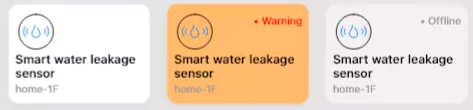
- 卡片背景颜色:
(1)白色表示设备在线,对应 states.online == True,同时右上角显示 .Normal
(2)灰色表示设备离线,对应 states.online == False,同时右上角显示 .Offline
(3)黄色代表 检测到有水漏 告警,同时右上角显示 .Warning,安防检测类设备都会有对应的告警,比如天然气检测器,检测到天然气会报警,烟雾检测器 检测 到烟雾会报警
- 左上角 是 设备的icon,这个是基于设备类型字段
- Honeywell Smoke Detector,这个是基于 name.nicknames[0] 字段
- home_1F,这个是基于 roomHint 字段
【设备管理页】
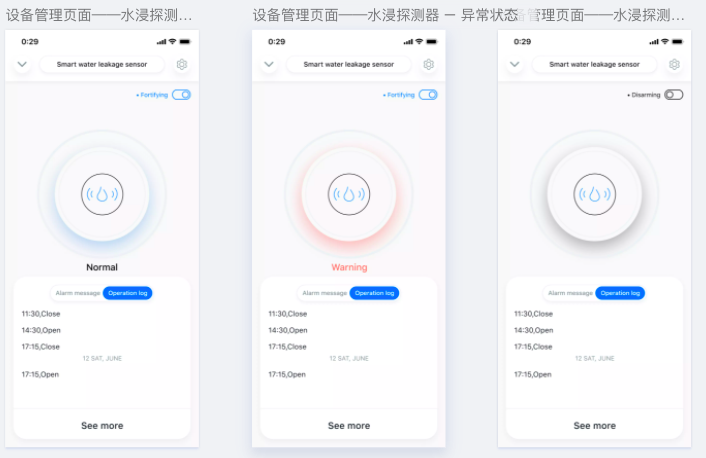
- 标题 是 设备的昵称
- 右上角 设置 按钮,点击进入设备详细设置,包括设置设备昵称,设备归属房间,删除设备等。
- 右上角 切换按钮,是设备设防/撤防切换按钮
- 中间部分,显示当前检测器检测状态,第一张图表示状态正常(no_water_leak_detected), 第二张图表示告警状态(water_leak_detected),第三张图表示当前处于撤防状态,不会显示正常/告警状态。
- 下半部分,显示历史告警信息和历史操作日志
【设备详细设置页面】
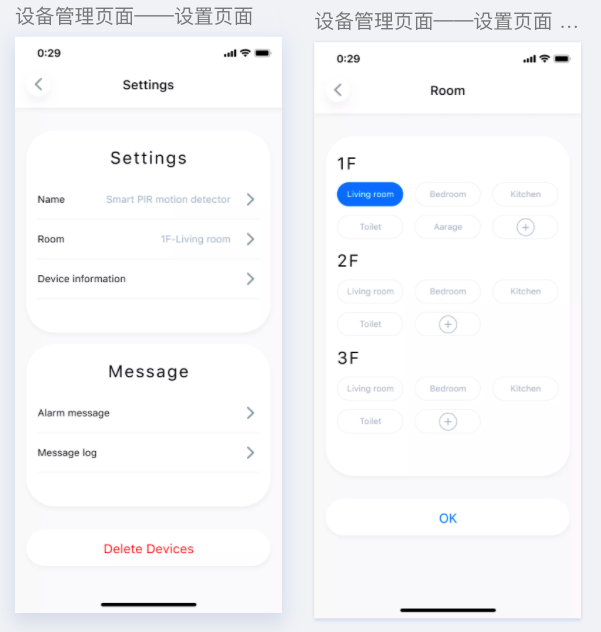
- 点击 name, 修改设备昵称
- 点击 room, 修改设备归属房间
- 点击 device information, 查看设备厂商/型号/固件信息
- 点击 alarm message, 查看设备历史告警信息
- 点击 message log, 查看设备操作日志
- 点击 delete device, 删除设备,提示用户确认删除
### 3. 设备类型 type
```devices.types.WATER_LEAK_DETECTOR```
### 4. 设备类别 category
```devices.category.SECURITY_DETECTOR```
### 5. 设备支持的 traits
```
"action.devices.traits.ArmDisarm" # 表示设备支持 设防撤防功能
"action.devices.traits.SensorState" # 表示设备支持某种类型的传感器检测,具体检测能力,参考设备的attributes.sensorStatesSupported字段
"sensorStatesSupported": [{
"name": "waterLeakDetectState",
"descriptiveCapabilities": {
"availableStates": [ "water_leak_detected", "no_water_leak_detected"]
},
"updateTime": null
}]
# 传感器状态字段:waterLeakDetectState
# 取值范围:[ "water_leak_detected", "no_water_leak_detected"]
```
### 6. 设备支持的指令控制
<b>(1) 设防</b>
- 接口URL
{base_url}/execute_device
- Body_Para
```
{
"owner_id": <owner_id>,
"house_id": "<house_id>",
"device_id": "<device_id>",
"executions": [{
"command": "action.devices.commands.ArmDisarm",
"params": {
"isArmed": True
}
}]
}
```
<b>(2) 撤防</b>
- 接口URL
{base_url}/execute_device
- Body_Para
```
{
"owner_id": <owner_id>,
"house_id": "<house_id>",
"device_id": "<device_id>",
"executions": [{
"command": "action.devices.commands.ArmDisarm",
"params": {
"isArmed": False
}
}]
}
```
### 7. 修改设备名称 和 归属的房间
>w 参考 接口说明 | 设备管理 章节
### 8. 获取设备操作日志
### 9. 获取设备历史告警列表
### 10. 设备支持的用来作为场景条件的状态事件
### 11. 设备支持的可用来作为场景动作的设备控制指令