4.公共接口文档
## <a id="4.1.上传文件接口">4.1.上传文件接口</a>
>d 该接口将需要上传的文件上传至发放平台服务器,获取到对应的地址用于其他接口作为入参
开发环境:https://pay-dev.lx-rhino.com
生产环境:https://api.lx-rhino.com
#### 接口地址:
/open/api/v1/common/uploadFile
#### 请求方式:POST
#### 请求参数说明:
|参数名称|参数含义|是否必填|参数备注|
|-|-|-|-|
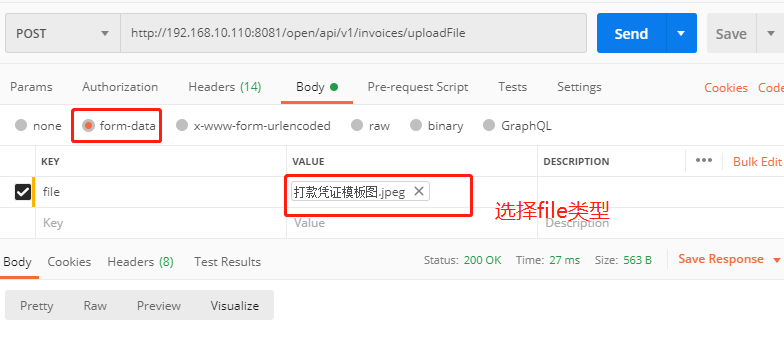
|file|文件|是||
#### 响应参数说明:
|参数名称| 参数含义| 是否必有| 参数备注|
|-|-|-|-|
|url|文件地址|是||
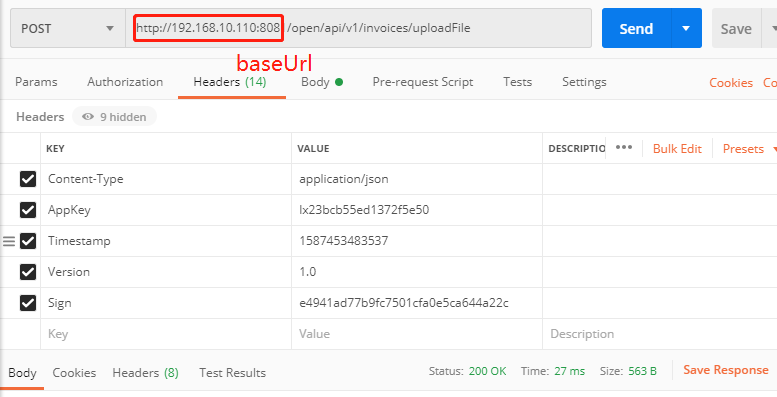
java接口代码示例:
```json
public String upload(MultipartFile file) {
String url = baseUrl +"/open/api/v1/invoices/uploadFile";
final byte[] bytes ;
try {
bytes = file.getBytes();
String appKey = "";
String version = "1.0";
String secretkey = "";
String timestamp = String.valueOf(System.currentTimeMillis());
//注意此处签名无 body拼接
String localString = "&Timestamp=" + timestamp + "&AppKey=" + appKey + "&Version=" + version + "&SecretKey" + secretkey;
String sigin = Md5Util.getMd5(localString);
MultipartBody body = new MultipartBody.Builder()
.setType(MediaType.parse("multipart/form-data"))
.addFormDataPart("file", file.getOriginalFilename(), okhttp3.RequestBody.create(MediaType.parse("image/" + "打款凭证"), bytes))
.build();
Request request = new Request.Builder()
.post(body)
.addHeader("AppKey", appKey)
.addHeader("Timestamp", timestamp)
.addHeader("Version", "1.0")
.addHeader("Sign", sigin)
.url(url)
.build();
Call call = HttpUtil.getOkHttpClient().newCall(request);
try {
Response response = call.execute();
String res = response.body().string();
log.info("res====" + res);
return res;
} catch (IOException e) {
log.error("HttpUtil.post网络请求失败:{}", e.getMessage());
return "网络请求失败";
}
} catch (IOException e) {
log.warn("fail to read file", file.getOriginalFilename(), e);
}
return null;
}
```
postman 直接请求示例: