GoogleHome对接
## Google Home 对接
目前支持如下sps设备同步到 Google home:
- 开关类设备
每一路开关 对应一个google 设备。多路开关 会同步多个设备到google home。
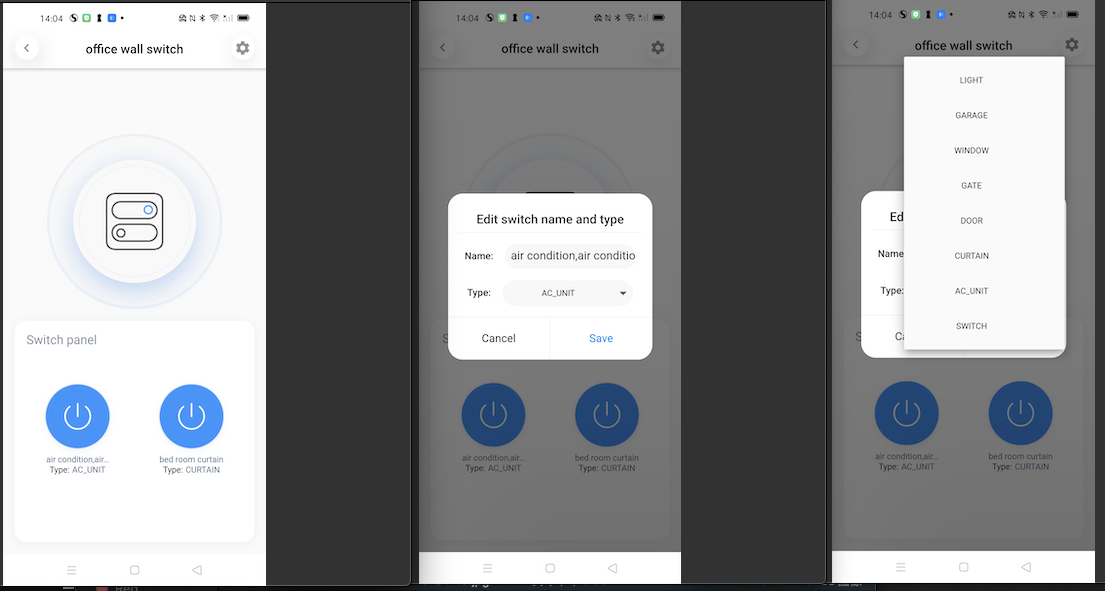
开关对应google设备类型,默认是switch,可以通过sps app修改每路开关对应的类型,目前支持如下类型:
|类型|google设备类型编码|控制|
|-|-|-|
|swtich|action.devices.types.SWITCH|turn on/off <nick_name>, switch on/off <nick_name>|
|light|action.devices.types.LIGHT|turn on/off <nick_name>|
|garage|action.devices.types.GARAGE|open/close <nick_name>|
|window|action.devices.types.WINDOW|open/close <nick_name>|
|gate|action.devices.types.GATE|open/close <nick_name>|
|door|action.devices.types.DOOR|open/close <nick_name>|
|curtain|action.devices.types.CURTAIN|open/close <nick_name>|
|air condition|action.devices.types.AC_UNIT|turn on/off <nick_name>|
>d 不同的设备类型,会影响 1. google home上显示的icon,2. 控制词语不同。比如 如果是开关的类型是light, 那么通过turn on/off来控制设备开关,如果开关类型是door, 那么可以通过open/close来控制。
- 手动执行场景
sps手动执行场景 同步成 google 的 scene类型设备,通过如下词语控制:
<i>start home mode</i>
<i>start home</i>
<i>activate home mode</i>
<i>activate home</i>
>d home是场景的名称。手动执行场景无法回退,即不能通过deactivate home mode来控制。
场景同步到goole home app后,在google home app看不到设备,目前国内手机测试是这样,但是可以通过语音控制。
- 传感器类设备
传感器类设备,会同步到goole home,但是由于google assitant的支持有限,目前暂时不支持语音控制。
后面有可能 参考其他厂商做法,把传感器设备同步成开关设备到google home.
SPS APP修改开关类型: