执法系统交接文档
>i 一、南京地铁行政执法
>i web端SVN:http://221.6.30.202:8443/svn/shide/idea_njdtxzzf
移动端SVN:http://221.6.30.202:8443/svn/javaroot/njdtxzzfapp3.0/DtzfApp_newHome
>d部署操作:连接地铁VPN,访问堡垒机地址:https://192.168.103.22/
堡垒机账号:gaoxin 密码:GaoXinMetroBlj@321
服务器ip:192.168.4.133
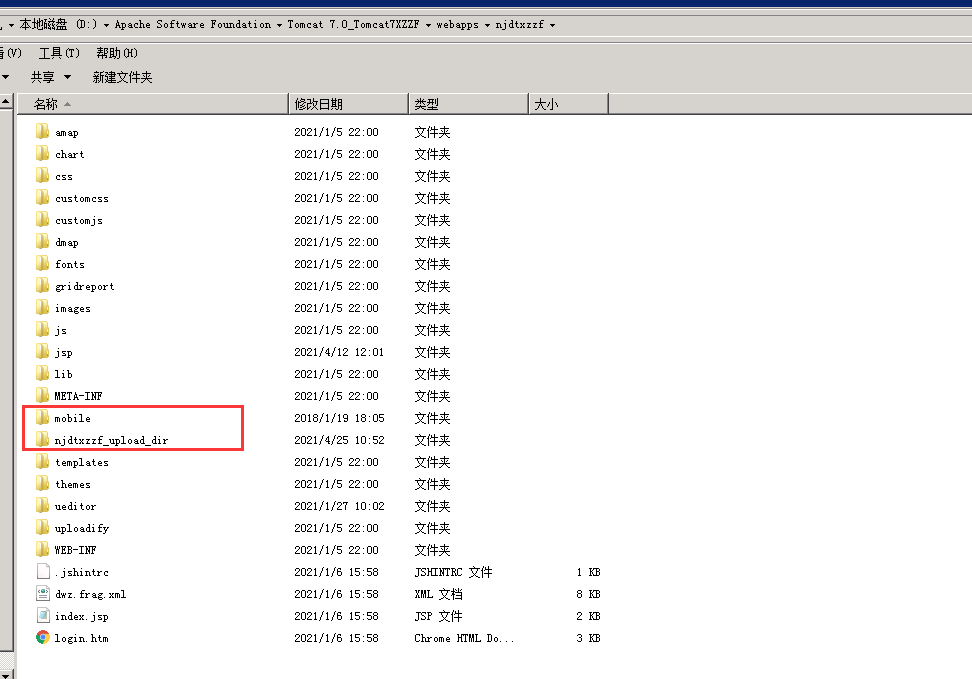
部署时替换tomact中webapps下面的项目,注意下图红框中的文件夹不可替换!mobile是app文件夹,里面存放app安装包和app部分功能的页面。
njdtxzzf_upload_dir是附件文件夹,不可被替换或者覆盖!
>d 主要维护内容:
(1) 价值观管理:主要维护模板、分数;规则:每人每季度填写上季度的价值观,目前季度限制已关闭(仅web端关闭),修改位置 TemplateAction:
```java
if(applyedList!=null&&applyedList.size()>0){
//formUrl ="jsp/staffMs/jzgAssessment/input/Prompt.jsp"; //如上季度已填写价值观则跳转提示页面,不允许填报
setIsAllowed("1");
String roleId = req.getParameter("rowId");
processKey = "njdt-jzg-fzdz";
processUrl = "process_startProcess.action?businessKey=njdt-jzg&processKey="+ processKey;
formUrl = "jzg_form.action?processKey=" + processKey+"&roleId="+roleId;
opeartorUrl = operatorUrlJzg;// 按钮表单
fileUrl = "fileUpload_fileUploadPage.action";
redirectUrl = redirectPageUrl;
}
```
>d 主要方法类:JzgAssessmentAction
主要操作表: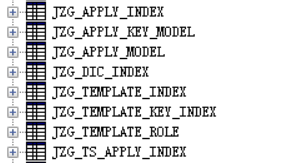
其中apply的3张为申请表,template的3张为模板表,ts的表是特殊价值观表,dic是字典表。
(2) NFC管理:为加快查询效率,新增每日nfc表逻辑,每次打卡会除了保存在总表,还会保存一份在每日表中,用于判断查询,使用定时器,每天清空一次每日表。定时器方法位置TimeKeyerAction:
```java
public void deleteTodayNfc(){
Map<String,Object> tmap = new HashMap<>();
List<NfcNewLogsToday> list = patroPointslService.findAll("NfcNewLogsToday",tmap);
if(list!=null&&list.size()>0){
patroPointslService.reomveAllToday(list);
}
List<NfcLogsToday> list2 = patroPointslService.findAll("NfcLogsToday",tmap);
if(list2!=null&&list2.size()>0){
patroPointslService.reomveAllToday2(list2);
}
}
```
>d 定时器配置位置applicationContext.xml:
```java
<bean id="deleteNfc" class="cn.gx.njdt.web.action.TimeKeyerAction"></bean>
<bean id="deleteNfcData"
class="org.springframework.scheduling.quartz.MethodInvokingJobDetailFactoryBean">
<property name="targetObject">
<ref bean="deleteNfc" />
</property>
<property name="targetMethod">
<value>deleteTodayNfc</value>
</property>
</bean>
<bean id="deNdc" class="org.springframework.scheduling.quartz.CronTriggerBean">
<property name="jobDetail">
<ref bean="deleteNfcData" />
</property>
<property name="cronExpression">
<value>0 50 23 * * ? </value>
</property>
</bean>
<bean id="schedulerFactory" lazy-init="false" autowire="no"
class="org.springframework.scheduling.quartz.SchedulerFactoryBean">
<!-- <property name="triggers" ref="cronUpdateStu"/> -->
<property name="triggers">
<list>
<ref local="deNdc"/>
</list>
</property>
</bean>
```
>d (3) 票务、授权案件统计:因为统计效率较慢,采用定时器的方式,每日夜里统计,保存在数据库表中,页面直接查询统计好的数据展示。定时器方法位置TimeKeyerAction:
```java
pwCaseCount()//统计票务数据
sqCaseCount()//统计授权数据
pwCaseCountToday()//统计当天票务数据
sqCaseCountToday()//统计当天授权数据
```
>d定时器配置位置applicationContext.xml:
```java
<bean id="schedulerFactory" lazy-init="false" autowire="no"
class="org.springframework.scheduling.quartz.SchedulerFactoryBean">
<!-- <property name="triggers" ref="cronUpdateStu"/> -->
<property name="triggers">
<list>
<ref local="cronUpdateStu" />
<ref local="cronUpdateStuToday" />
</list>
</property>
</bean>
```
>d (4)移动端案件打印:移动端控制类:PointSysActivity,提交案件后跳转至该控制类,用于展示打印页面和扫描连接蓝牙打印机。
打印展示方法:
```java
/**初始化数据*/
@Override
protected void initData() {
//super.initData();
new Thread() {
public void run() {
IResult result = appContext.getPrintText(acPointId,acType);
Message msg = new Message();
msg.what = RESULT_PRINT_TEXT;
msg.obj = result;
mHandler.sendMessage(msg);
}
}.start();
//String url= "http://njmetro.com.cn:80/njdtxzzf/mobilePrint_pointHtml.action?acPointId="+acPointId+"&acType="+acType;
//String url= "http://36.152.69.179:7077/njdtxzzf/mobilePrint_pointHtml.action?acPointId="+acPointId+"&acType="+acType;
String url= "http://221.226.59.99:7077/njdtxzzf/mobilePrint_pointHtml.action?acPointId="+acPointId+"&acType="+acType;
//String url= "http://221.6.30.202:8893/njdtxzzf/mobilePrint_pointHtml.action?acPointId="+acPointId+"&acType="+acType;
//String url= "http://10.10.254.18:8080/njdtxzzf/mobilePrint_pointHtml.action?acPointId="+acPointId+"&acType="+acType;
// String url= "http://192.168.100.45:8080/njdtxzzf/mobilePrint_pointHtml.action?acPointId="+acPointId+"&acType="+acType;
WebSettings settings = webView.getSettings();
settings.setJavaScriptEnabled(true);
settings.setUseWideViewPort(true);
settings.setLoadWithOverviewMode(true);
settings.setAppCacheEnabled(false);
settings.setSupportZoom(true);
settings.setLayoutAlgorithm(WebSettings.LayoutAlgorithm.SINGLE_COLUMN);
settings.setFixedFontFamily(ffft);
webView.setScrollBarStyle(View.SCROLLBARS_OUTSIDE_OVERLAY);
//去掉滚动条
webView.setVerticalScrollBarEnabled(false);
webView.setHorizontalScrollBarEnabled(false);
webView.setInitialScale(50);
webView.getSettings().setTextZoom(130);
//去掉缩放按钮
if (Build.VERSION.SDK_INT >= Build.VERSION_CODES.HONEYCOMB) {
// Use the API 11+ calls to disable the controls
settings.setBuiltInZoomControls(true);
settings.setDisplayZoomControls(false);
} else {
// Use the reflection magic to make it work on earlier APIs
getControlls();
}
webView.setTag(url);
loadHistoryUrls.add(url);
webView.loadUrl(url);
//覆盖WebView默认使用第三方或系统默认浏览器打开网页的行为,使网页用WebView打开
webView.setWebViewClient(new WebViewClient() {
@Override
public boolean shouldOverrideUrlLoading(WebView view, String url) {
// TODO Auto-generated method stub
//返回值是true的时候控制去WebView打开,为false调用系统浏览器或第三方浏览器
view.loadUrl(url);
loadHistoryUrls.add(url);
return true;
}
});
webView.addJavascriptInterface(new Object(){
@JavascriptInterface
public void submitOk() {
TispToastFactory.getToast(context, "提交成功").show();
}
@JavascriptInterface
public void notNull(String property) {
TispToastFactory.getToast(context, property +"不能为空").show();
}
},"android");
new Thread() {
public void run() {
IResult result = null;
Message msg = new Message();
msg.what = AppConfig.LISTVIEW_ACTION_INIT;
msg.obj = result;
mHandler.sendMessage(msg);
}
}.start();
}
```
>d 蓝牙扫描方法(2种),一种是即时扫描附近蓝牙设备,第二种是直接获取手机已配对的蓝牙设备,目前使用的是第二种。控制方法:
```java
//获取默认配对的蓝牙列表
private void initBluetoothList(){
adapterinit = BluetoothAdapter.getDefaultAdapter();
if (adapterinit != null) {
if (!adapterinit.isEnabled()) {
adapterinit.enable();
//sleep one second ,avoid do not discovery
try {
Thread.sleep(1000);
} catch (InterruptedException e) {
e.printStackTrace();
}
}
Set<BluetoothDevice> devices = adapterinit.getBondedDevices();
blueList = new ArrayList<HashMap>();
for (BluetoothDevice bluetoothDevice : devices)
{
if(bledata_compare.contains(bluetoothDevice.getAddress())) {
}else{
blueHashMap = new HashMap();
blueHashMap.put("blue_device",bluetoothDevice);
blueHashMap.put("blue_name",bluetoothDevice.getName());
blueHashMap.put("blue_address",bluetoothDevice.getAddress());
blueList.add(blueHashMap);
bledata_compare.add(bluetoothDevice.getAddress());
BaseInfo be = new BaseInfo();
be.setTitle(bluetoothDevice.getAddress());
be.setOpname(bluetoothDevice.getName()+"(已配对)");
bledata.add(be);
adapter.notifyDataSetChanged();
}
}
}else{
Toast.makeText(context, "本机没有蓝牙设备", Toast.LENGTH_SHORT).show();
}
}
```
>d 打印方法:
```java
private void startPoint(){
if (mBluetoothAdapter == null) {
Toast.makeText(context, "该设备不支持蓝牙", Toast.LENGTH_SHORT).show();
return;
}
//获取名字 MAC地址
String name = mBluetoothAdapter.getName();
String address = mBluetoothAdapter.getAddress();
//获取蓝牙的状态
int state = mBluetoothAdapter.getState();
BluetoothDevice mDevice = BluetoothAdapter.getDefaultAdapter().getRemoteDevice(pointAdress);//devicesAddress为蓝牙的mac地址
PrinterInstance mPrinter = PrinterInstance.getPrinterInstance(mDevice, mHandler1);
mPrinter.openConnection();
//开始打印数据
//打印前判断连接是否正常,且打印机不缺纸,不开盖
if (mPrinter != null&&mPrinter.getCurrentStatus() == 0){
bmp = convertViewToBitmap(webView);
//saveBitmap(context,bmp);
if(title!=null&&title.length()>0){
mPrinter.initPrinter();
mPrinter.setFont(0,0,0,1,0);//设置字体,倍高,倍宽,加粗,下划线
mPrinter.setPrinter(PrinterConstants.Command.ALIGN, PrinterConstants.Command.ALIGN_CENTER);//设置字体居中
mPrinter.printText(title);
//mPrinter.printImage(bmp, PrinterConstants.PAlign.START, 0, false);//位图打印
mPrinter.setFont(0,0,0,0,0);//设置字体,倍高,倍宽,加粗,下划线
mPrinter.setPrinter(PrinterConstants.Command.ALIGN, PrinterConstants.Command.ALIGN_LEFT);//设置字体居中
try {
TimeUnit.SECONDS.sleep(1);
mPrinter.printText(contentText);//打印文本printTest!
} catch (InterruptedException ie) {
Thread.currentThread().interrupt();
}
/*mPrinter.setPrinter(PrinterConstants.Command.PRINT_AND_WAKE_PAPER_BY_LINE, 2);
mPrinter.setFont(1,1,1,1,1);//设置9*17压缩字体,倍高,倍宽,加粗,下划线
mPrinter.printText("printTest!" + "\r\n");//打印文本printTest!*/
}else{
Toast.makeText(context, "打印信息未获取成功,请重试! ", Toast.LENGTH_SHORT).show();
}
}else {
//这里打印机状态异常:通信异常,缺纸,开盖,纸将尽
Toast.makeText(context, "打印机异常! "+mPrinter.getCurrentStatus(), Toast.LENGTH_SHORT).show();
}
/* int ret = mPrinter.getPrintingStatus(5000);
if(ret == 0){
}*/
mPrinter.closeConnection();//断开连接
//mBluetoothAdapter.stopLeScan(leScanCallback);//停止扫描
//disableBle();//蓝牙关闭
}
```
>d(5)移动支付补数据,两种情况,一是支付宝支付成功后,网络波动导致系统没有收到推送结果,我们的数据库没有保存到数据,这种情况让客户提供支付宝后台的支付详情,手动补充数据到
第二种情况是获取每日支付宝推送失败,这种情况需要手动同步,手动同步位置MobilePwPayMoneyAction:
```java
selectAcPwZfbCompareOrderList()
try { //开启后补遗漏的对账单
doZfb("2020-09-19",3);
} catch (ParseException e1) {
// TODO Auto-generated catch block
e1.printStackTrace();
}
```
>d(6)已完成但一直未上线的功能:人才评价二期: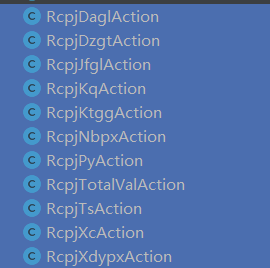
移动端打印预览功能:限制必须预览,预览读秒
目前开发完成但注释掉了,如果要开启,去4个案件类中,把隐藏掉的预览按钮显示出来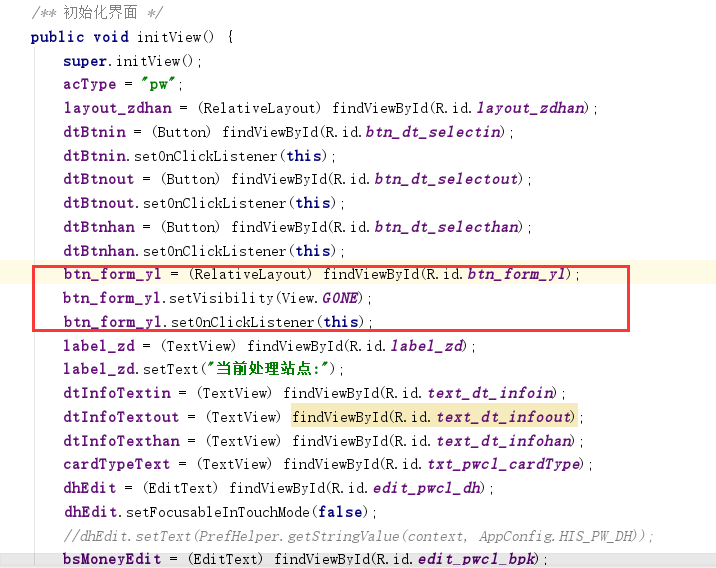
如需开放强制预览,则在对应4个案件类中的validate()方法中,把判断放开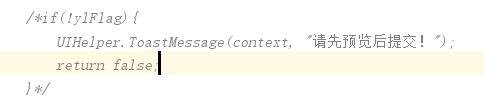
每日健康上报功能:开发完成未开放使用,如需开放,则把fragment_home.xml中的入口显示出来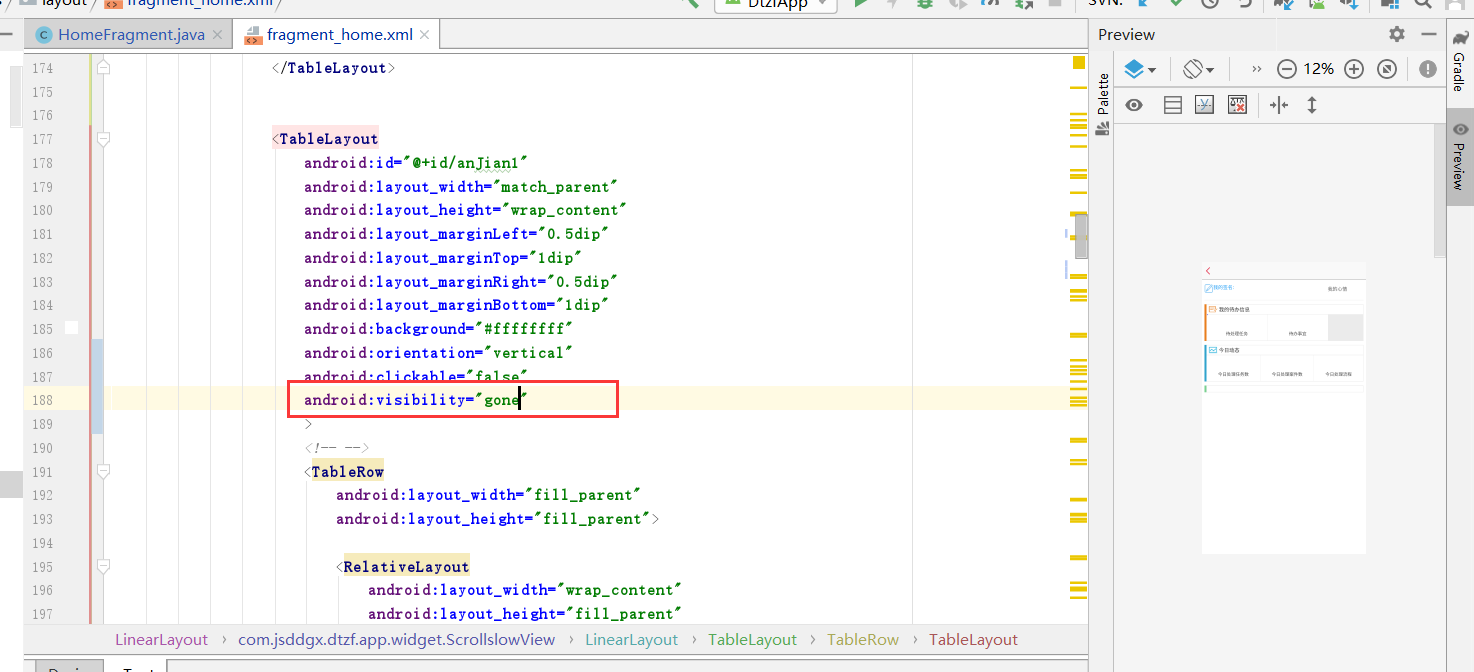
web中每日推送健康日报的方法在TimeKeyerAction中
```java
public void addEpidemicDeclaration(){
System.out.println("进入每日健康上报定时器");
Map<String,Object> tmap = new HashMap<>();
List<VTeam> list = patroPointslService.findAll("VTeam",tmap);
SimpleDateFormat formatter = new SimpleDateFormat("yyyy-MM-dd HH:mm:ss");
Date date=new Date();
EpidemicDeclaration epi=new EpidemicDeclaration();
try {
epi.setCreateDate(formatter.parse(formatter.format(date)));//创建时间
} catch (ParseException e) {
e.printStackTrace();
}
epi.setStatus("0");
//查询当天已创建人员
Map<String, String> map1 = new HashMap<String, String>();
String beginTime="";
SimpleDateFormat spt=new SimpleDateFormat("yyyy-MM-dd");
if (beginTime == null || beginTime.trim().isEmpty()) {
beginTime = spt.format(date);
}
map1.put("beginTime", beginTime);
map1.put("endTime", beginTime);
List<EpidemicDeclaration> ycj=jkkService.getJkkBmtj(map1,null);
List<VTeam> notIndexRowIds=new ArrayList();
List<VTeam> xt=new ArrayList();
for (VTeam user:list){
for (EpidemicDeclaration ep:ycj){
if (user.getUserId().equals(ep.getCreateUserId())){
xt.add(user);
}
}
}
for (VTeam user:list){
int i=0;
for (VTeam ep:xt){
if (user.getUserId().equals(ep.getUserId())){
i=1;
}
}
if (i!=1){
notIndexRowIds.add(user);
}
}
for (VTeam user:notIndexRowIds){
epi.setCreateOrgName(user.getOrgname());
epi.setCreateOrgId(user.getOrgid());
epi.setCreateUserId(user.getUserId());
epi.setCreateUserName(user.getUserName());
patroPointslService.save(epi);
}
}
```